Magento PII Encryption: A Practical Pattern for Protecting Sensitive Customer Data in Legacy eCommerce Systems
Introduction
Every legacy eCommerce platform eventually runs into the same uncomfortable question: what exactly is sitting in plaintext inside the database?
At first, most systems do not look especially dangerous. A few customer attributes get added for compliance, then another field for onboarding, then a document upload, then some internal verification data. A year later, the customer entity is carrying identification numbers, uploaded files, and other fields that really should not be sitting in normal application storage.
That is usually the moment when GDPR stops feeling abstract. It becomes a very practical engineering problem. If a backup leaks, if a staging copy is created carelessly, if an internal admin account is over-permissioned, or if a production incident forces a database review, plaintext PII suddenly becomes a much larger liability than the original feature ever seemed to justify.
This extension was built for exactly that situation. Instead of treating sensitive customer data as ordinary profile data, it gives that data its own lifecycle. Selected attributes are intercepted before they are persisted normally, encrypted, stored in a dedicated PII layer, and only decrypted again when a very specific workflow is allowed to see them.
That makes it useful as a real-world pattern for:
Magento PII encryptionMagento customer data securityMagento 1 data protectionMagento GDPR securitysecure personal data storage PHPencrypt customer data PHP
And because the core design is architectural rather than Magento-specific, it also maps well to Magento 2, Laravel, Symfony, and custom PHP systems.
Why Encrypting Customer Data Matters
The risk with PII is rarely theoretical. Once sensitive data is stored in ordinary database columns, it starts spreading in ways teams do not always notice at first. It ends up in replicas, backups, exports, support tooling, admin panels, staging copies, and all the little operational corners that grow around a mature eCommerce system.
That is why plaintext customer data is such a weak default. Even if the application has authentication and authorization, the database itself becomes the disclosure surface. Anyone with enough access to read production data can read the very values that should have been isolated the most carefully.
Under GDPR and any serious internal security policy, that is a hard position to defend. There is no meaningful separation between “the application needs this value to perform a task” and “the organization is casually storing personal data in readable form.”
The safer pattern is to stop pretending that all customer attributes are equal. Some are just profile data. Some are secrets. Once that distinction is made, the architecture changes. The main customer entity keeps only safe surrogates and references, while the true value moves into a dedicated encrypted store. That is the idea behind this extension, and it is the reason the design stays useful even outside Magento 1.
What This Extension Does
This extension focuses on selected customer PII fields, not on blanket encryption of every Magento entity.
That design choice matters. Trying to encrypt everything at once usually turns into a maintenance problem. Protecting the fields that genuinely deserve stronger handling is both more realistic and more effective.
The protected attributes are configurable in system configuration. Each field is defined with three pieces of metadata:
- the Magento attribute code
- the logical storage table for the protected value
- the field type, either text-like or document-like
In practice, the strongest examples are identification-style fields and uploaded documents. Those are exactly the fields that become painful when they leak, awkward when they appear in exports, and difficult to justify when left in plaintext.
What makes the implementation useful is that it does not just encrypt a value and put the ciphertext back into the same customer attribute. That would still leave too much of the surrounding application treating the field like ordinary data. Instead, it changes the storage model itself.
When a customer saves a protected field, the extension intercepts that moment, encrypts the real value, stores it in a dedicated PII table, and leaves behind only a safe placeholder or metadata value in the customer entity. Later, when an authorized workflow genuinely needs the true value, the extension retrieves and decrypts it explicitly.
So the customer entity stays usable, but the most sensitive data no longer behaves like ordinary profile data. That is really the point of the whole design.
Architecture Overview
The architecture is built around a simple idea: the customer model should not be the vault.
The customer entity still exists in its normal Magento shape, and that is important because the rest of the platform still needs a customer model it can work with. But the true secret value lives elsewhere. The visible model holds only enough information for the application to function safely, while the encrypted payload is stored in a dedicated PII store. A small reference field connects the customer to the cryptographic material needed for retrieval.
That creates a clean separation between public model state and protected secret state. Once that line is drawn, the rest of the implementation becomes much easier to reason about.
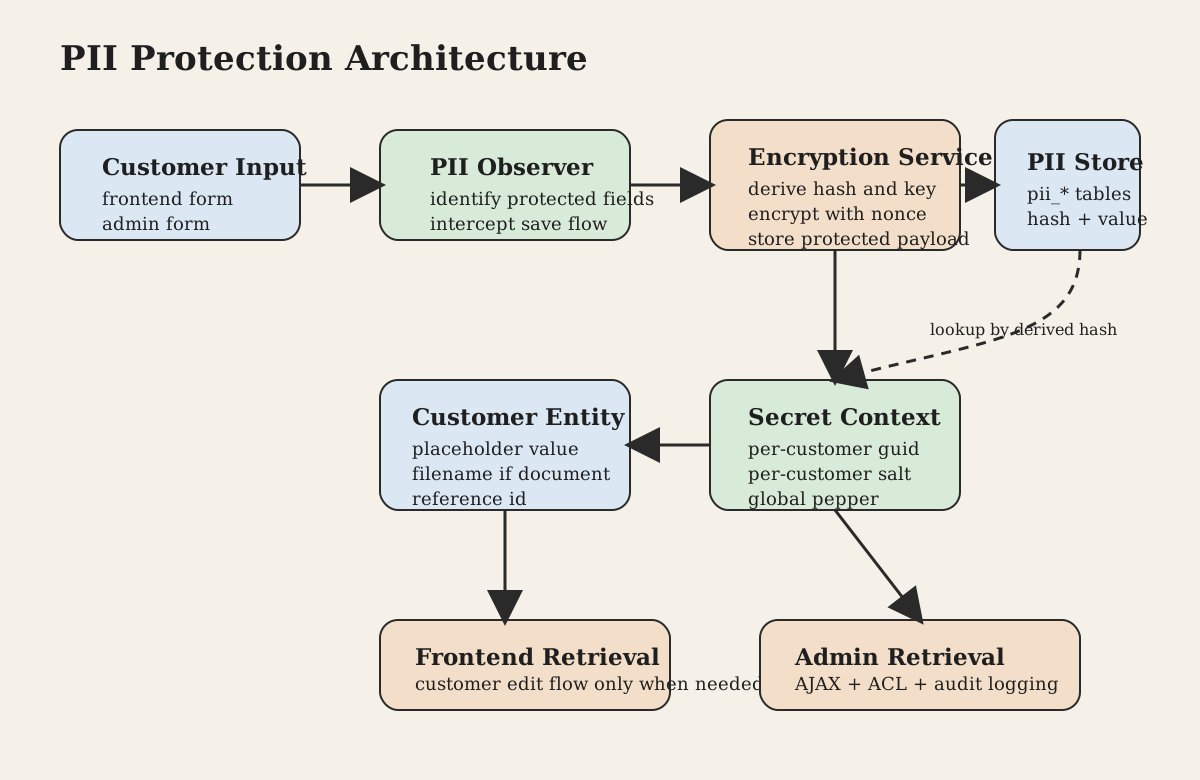
At runtime, the system has four responsibilities.
It first decides which fields count as PII. That is handled through configuration rather than by hardcoding everything into PHP, which makes the pattern reusable across projects with different compliance needs.
It then intercepts the right save flows. Instead of rewriting large pieces of Magento, the extension hooks into customer save events in frontend, admin, and service-style flows. That keeps the implementation narrow and avoids turning encryption into a platform-wide rewrite project.
After that comes the cryptographic work itself. A helper layer handles key derivation, hashing, encryption, storage, retrieval, and decryption. The implementation uses libsodium primitives rather than ad hoc crypto, which is exactly what you want in a module like this.
And finally, it controls access. Sensitive values are not simply pushed back into the model on every load. Decryption is conditional and route-aware. Some screens get placeholders, some get nothing, and only specific authorized flows retrieve the real data.
Mermaid Architecture Diagram
graph TD
    A[Frontend or Admin customer input] --> B[PII observer]
    B --> C[Encryption service]
    C --> D[Per-customer guid and salt]
    C --> E[Derived key and lookup hash]
    E --> F[Encrypted value in pii_field table]
    B --> G[Customer entity]
    G --> H[Protected placeholder or filename]
    G --> I[Reference to encryption user record]
    F --> J[Controlled retrieval path]
    I --> J
    J --> K[Customer edit screen]
    J --> L[Admin AJAX view with ACL]
How Encryption and Decryption Work
The cryptographic side of the extension is one of its strongest ideas, because it does more than just encrypt a string with a single global application key.
Each customer is associated with a small record that holds a guid and a salt. Those values are not the protected data itself. They are part of the material used to derive field-specific cryptographic values. On top of that, the application uses a global pepper loaded from environment or node configuration.
That combination is what gives the design its shape. The key is not hardcoded per field, not reused blindly across the whole system, and not stored next to the protected value. It is derived when needed.
To protect a field, the extension derives an HMAC digest from the customer-specific guid and the field name, keyed by the global pepper. That digest is then passed through Argon2id using libsodium. The derivation produces two useful outputs: a lookup hash and an encryption key. The hash is used to find the correct row in the dedicated PII table. The key is used to encrypt and decrypt the real value.
So instead of saying “customer 123 has SSN value X,” the system effectively says: this customer and this field produce a deterministic secure lookup identifier, and the corresponding value can only be decrypted by re-deriving the right key material.
The actual encryption uses sodium_crypto_secretbox, with a random nonce generated for each encryption. The nonce is prepended to the ciphertext. For text fields, the resulting binary payload is base64-encoded before storage. For blob-style document fields, the raw encrypted content can be stored directly.
On retrieval, the process runs in reverse. The extension loads the customer’s cryptographic reference record, rebuilds the lookup hash and key, fetches the encrypted row from the correct pii_* table, splits the nonce from the ciphertext, and decrypts the content with sodium_crypto_secretbox_open.
There is also support for an old pepper value. That matters because key rotation is one of the hardest operational parts of any PII system. The old-key retrieval path means the system can keep reading legacy encrypted values during a migration period instead of forcing a brittle cutover.
Data Flow Lifecycle
The easiest way to understand the extension is to follow a protected value from the moment it enters the system to the moment someone tries to read it back.
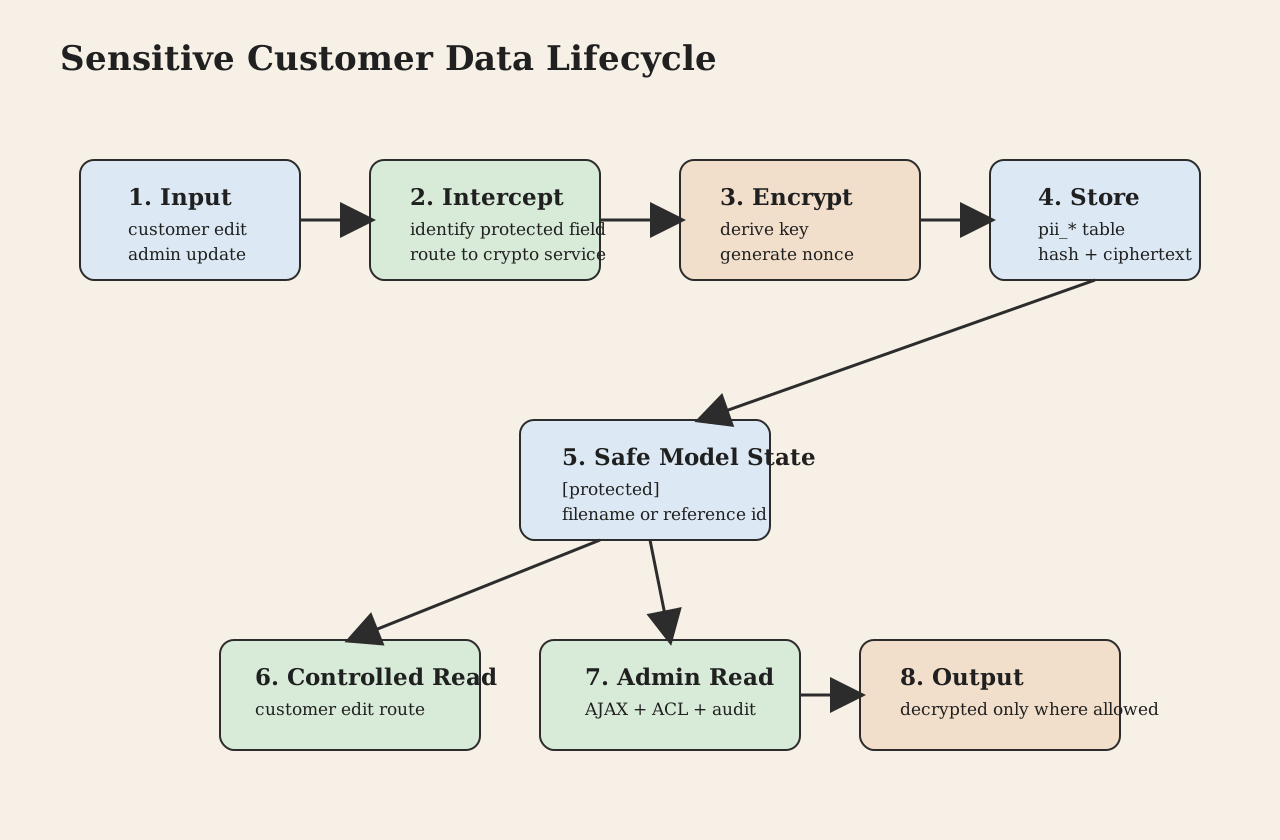
A customer or administrator submits a profile update. If that update includes a field marked as sensitive, the extension intercepts the save process before Magento treats it like a normal attribute write.
That is the first meaningful decision in the lifecycle. The system does not wait until later and try to clean things up after plaintext has already spread. It catches the value early enough that the protected version becomes the canonical stored version.
At that point, the extension checks which attributes are configured as PII. For each matching attribute, it extracts the incoming value. Document-like fields are handled slightly differently because the visible field and the uploaded binary content are not the same thing. Text fields and blob fields follow separate branches, but both end up in the same security model: the real value is diverted into protected storage.
If the customer does not yet have a cryptographic reference record, one is created. That record stores the per-customer guid and salt, and the customer entity stores a reference to it. The extension then derives the lookup hash and encryption key, encrypts the value, and upserts it into the dedicated pii_<field> table.
Only after that does the visible customer entity get updated. But what it receives is not the real secret. For text fields, it receives a marker such as [protected]. For document fields, it may keep a filename while the actual document bytes are stored encrypted elsewhere.
That is the write path.
The read path is much more selective. When a screen loads customer data, the extension does not automatically decrypt everything. Instead, decryption happens only in narrow, explicit flows.
On the frontend, the customer account edit path is one of the places where protected data can be restored into the in-memory model if needed.
In admin, the behavior is even more deliberate. Sensitive values are not simply populated into the edit form by default. The form works with placeholders and disabled fields until an authorized request explicitly asks for protected data. That request goes through a dedicated AJAX controller, which validates the form key, checks request type, loads the customer securely, verifies permissions, and only then returns the decrypted values that the current admin user is allowed to see.
So the lifecycle is not just input -> encryption -> storage -> decryption. It is input -> encryption -> isolated storage -> controlled access -> selective decryption. That distinction is what makes the pattern useful in real systems.
Mermaid Sequence Diagram
sequenceDiagram
    participant User as Customer or Admin
    participant Magento as Magento
    participant Obs as PII observer
    participant Crypto as Encryption service
    participant Customer as Customer entity
    participant Vault as PII storage

    User->>Magento: submit customer data
    Magento->>Obs: customer save event
    Obs->>Obs: identify protected fields
    Obs->>Crypto: store protected value
    Crypto->>Customer: ensure encryption reference exists
    Crypto->>Crypto: derive key and lookup hash
    Crypto->>Vault: upsert encrypted payload
    Obs->>Customer: save placeholder or filename

    User->>Magento: open permitted screen
    Magento->>Obs: load customer or explicit admin request
    Obs->>Crypto: retrieve protected value
    Crypto->>Crypto: rebuild key and lookup hash
    Crypto->>Vault: fetch encrypted payload
    Crypto-->>Obs: decrypted plaintext
    Obs-->>Magento: assign runtime value
    Magento-->>User: render authorized data
Magento Admin Impact
The admin behavior is where the extension becomes especially practical, because this is where many PII solutions fail. They encrypt the database but leave the back office behaving as if plaintext is still normal.
This extension takes a stricter path.
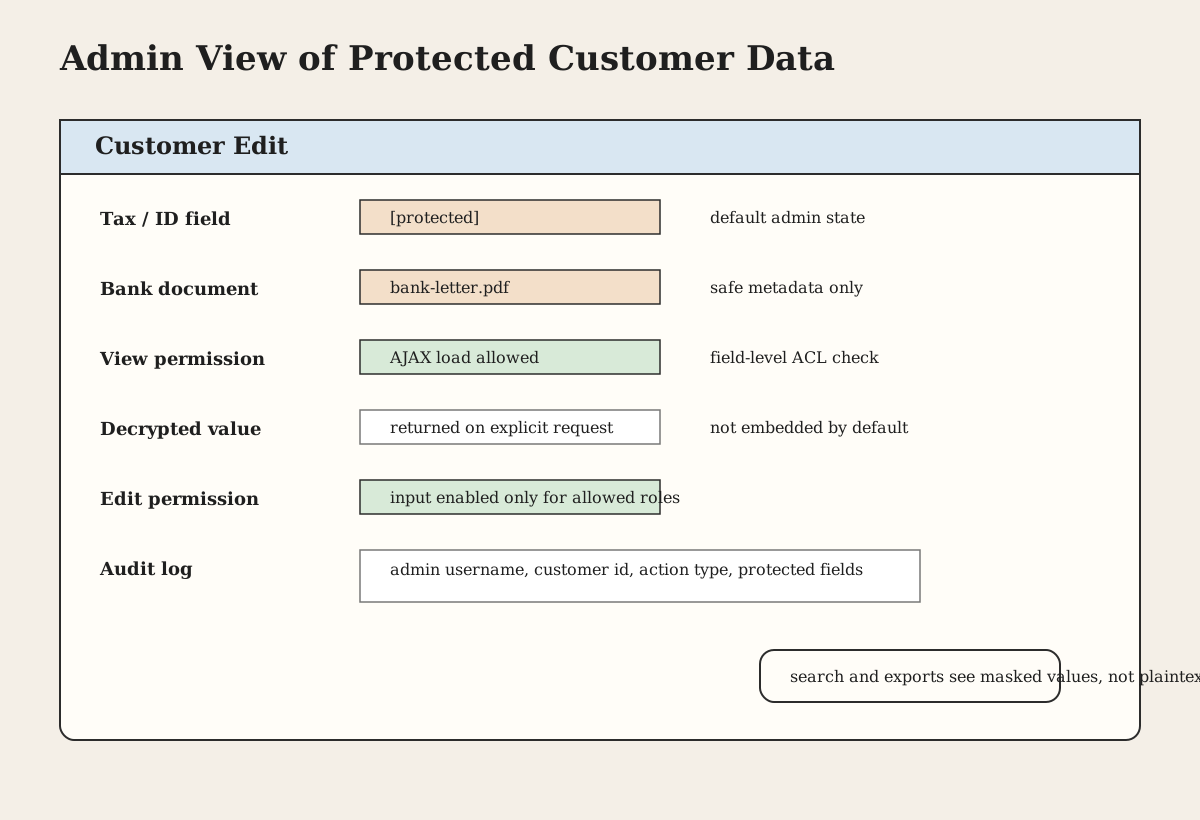
When an administrator opens a customer edit screen, protected fields are not treated like ordinary profile fields. The UI initializes them in a protected state. Inputs are disabled by default, and fields can show [protected] instead of the real underlying value. That alone reduces accidental exposure on shared screens or in routine support work.
Then ACL enters the picture. The extension defines field-level permissions for both viewing and editing specific protected attributes. So the question is no longer just “can this admin access customers?” but “can this admin view this exact type of protected data?” and separately “can this admin change it?”
That is a much better access model for sensitive customer data, and it is one of the reasons this implementation feels operationally mature instead of merely technical.
If the admin has the required permission, the actual value is fetched through a dedicated AJAX endpoint rather than being embedded into the page by default. That endpoint verifies the request, validates the form key, decrypts the customer identifier from the request payload, loads the customer, and returns only the allowed protected fields.
For binary document fields, the behavior goes a step further. The extension reconstructs the file client-side from the decrypted payload and allows it to be downloaded or replaced if the user has edit access. This gives document handling its own secure flow instead of pretending it is just another string attribute.
Another important piece is audit logging. When an admin views or edits protected fields, the extension writes an audit-style log entry showing who accessed which customer and which protected fields were involved. For PII systems, this matters as much as encryption itself. Secure storage without access traceability is only half a solution.
The cost of this design is that generic admin tooling becomes less convenient. Search, filters, exports, and generic data grids cannot behave as though the real values are sitting in customer columns. But that tradeoff is exactly what gives the model its integrity. Once you decide the data is sensitive enough to protect properly, convenience has to give way to control.
How Transparent Is This to the Rest of the System?
Only partly, and that is by design.
On write, the extension feels fairly transparent inside the flows it supports. A customer save happens, the sensitive value is intercepted, and the protected storage path is handled automatically.
On read, the behavior is intentionally not transparent. Most of the system will not see the real value unless it explicitly uses the retrieval path. In many cases it will only see [protected], a filename, or an empty value.
That may sound inconvenient, but it is exactly what keeps the protected data from leaking into every part of the application. If decryption were fully automatic everywhere, the encryption layer would quickly become cosmetic. The real security benefit comes from making access explicit.
So if someone wants to apply this pattern in their own project, this is one of the most important architectural lessons here: transparent encryption is attractive, but explicit decryption is often safer.
What Counts as PII in This Design
This extension is built to protect whichever customer attributes are registered as sensitive in configuration.
In the current shape, the clearest examples are identification-related fields and uploaded documents. That tells you a lot about the intended use case. This is not just about hiding ordinary profile cosmetics. It is about protecting the values that create the highest legal, compliance, and operational risk when stored in plaintext.
The extension is generic enough to protect more fields if they are added to the configuration matrix, but it should not be described as a full automatic encryption layer for names, addresses, emails, and phones unless those fields are explicitly registered and integrated into the same save and retrieval pattern.
That is an important boundary to keep clear in any production write-up.
Platform-Agnostic Implementation: Magento 2, Laravel, Symfony
Although this implementation lives in Magento 1, the architecture is not tied to Magento 1 at all. The real pattern is broader: identify high-risk fields, move them out of ordinary storage, encrypt them in a dedicated service, and only decrypt them on narrow authorized paths.
That is why it translates so well to newer stacks.
In Magento 2, this would naturally become a service-oriented design with observers or plugins around customer save flows, a dedicated secret-storage service, extension attributes or metadata fields for references, and admin ACL integrated into UI components or custom controllers. The major difference would be cleaner dependency injection and a much better separation between application services and infrastructure. The principle would stay the same.
In Laravel, the same idea would fit well into a dedicated encryption service, a secret repository, model observers or domain events around customer updates, and Eloquent mutators only for safe metadata, not for silently decrypting everything. This is especially relevant if you want a strong Laravel encryption service example for sensitive values rather than relying only on simple encrypted casts.
In Symfony, the pattern maps naturally to a service-based design with Doctrine listeners or application services, Symfony secrets or environment-managed peppers, explicit policy checks before decryption, and audit logging through Monolog or a dedicated compliance log model. That is what makes it a solid reference point for Symfony sensitive data handling.
The reason this architecture travels well is simple: it is not really about Magento internals. It is about drawing a hard line between ordinary business data and truly sensitive personal data.
PHP Code Examples
The examples below are intentionally framework-neutral. They are meant to show the architecture in a form that could be reused in Magento 2, Laravel, Symfony, or a custom PHP application.
Encryption Service Class
<?php

final class SensitiveDataEncryptionService
{
    public function __construct(
        private string $globalPepper,
    ) {}

    public function derive(string $userGuid, string $fieldName, string $salt): array
    {
        $digest = hash_hmac('sha256', $userGuid . $fieldName, $this->globalPepper, true);

        $key = sodium_crypto_pwhash(
            SODIUM_CRYPTO_SECRETBOX_KEYBYTES,
            $digest,
            $salt,
            SODIUM_CRYPTO_PWHASH_OPSLIMIT_SENSITIVE,
            SODIUM_CRYPTO_PWHASH_MEMLIMIT_MODERATE,
            SODIUM_CRYPTO_PWHASH_ALG_ARGON2ID13
        );

        $lookupHash = sodium_crypto_pwhash(
            SODIUM_CRYPTO_SECRETBOX_KEYBYTES,
            $key,
            $salt,
            SODIUM_CRYPTO_PWHASH_OPSLIMIT_SENSITIVE,
            SODIUM_CRYPTO_PWHASH_MEMLIMIT_MODERATE,
            SODIUM_CRYPTO_PWHASH_ALG_ARGON2ID13
        );

        return [
            'key' => $key,
            'lookup_hash' => base64_encode($lookupHash),
        ];
    }

    public function encrypt(string $plaintext, string $key): string
    {
        $nonce = random_bytes(SODIUM_CRYPTO_SECRETBOX_NONCEBYTES);
        $cipher = sodium_crypto_secretbox($plaintext, $nonce, $key);

        return base64_encode($nonce . $cipher);
    }
}
Decryption Logic
<?php

final class SensitiveDataDecryptionService
{
    public function decrypt(string $encodedCiphertext, string $key): string
    {
        $raw = base64_decode($encodedCiphertext, true);

        if ($raw === false) {
            throw new RuntimeException('Ciphertext is not valid base64.');
        }

        $nonceSize = SODIUM_CRYPTO_SECRETBOX_NONCEBYTES;
        $nonce = substr($raw, 0, $nonceSize);
        $cipher = substr($raw, $nonceSize);

        $plaintext = sodium_crypto_secretbox_open($cipher, $nonce, $key);

        if ($plaintext === false) {
            throw new RuntimeException('Decryption failed.');
        }

        return $plaintext;
    }
}
Secure Data Storage Flow
<?php

final class SensitiveValueWriter
{
    public function __construct(
        private SensitiveDataEncryptionService $crypto,
        private SensitiveValueRepository $repository,
    ) {}

    public function store(
        UserSecretContext $context,
        string $fieldName,
        string $plaintext
    ): void {
        $derived = $this->crypto->derive(
            $context->guid,
            $fieldName,
            $context->salt
        );

        $ciphertext = $this->crypto->encrypt($plaintext, $derived['key']);

        $this->repository->upsert(
            fieldName: $fieldName,
            lookupHash: $derived['lookup_hash'],
            encryptedValue: $ciphertext
        );
    }
}
Data Access Layer with Controlled Encryption and Decryption
<?php

final class SensitiveValueReader
{
    public function __construct(
        private SensitiveDataEncryptionService $crypto,
        private SensitiveDataDecryptionService $decryptor,
        private SensitiveValueRepository $repository,
    ) {}

    public function read(UserSecretContext $context, string $fieldName): ?string
    {
        $derived = $this->crypto->derive(
            $context->guid,
            $fieldName,
            $context->salt
        );

        $row = $this->repository->findByHash(
            fieldName: $fieldName,
            lookupHash: $derived['lookup_hash']
        );

        if ($row === null) {
            return null;
        }

        return $this->decryptor->decrypt($row->encryptedValue, $derived['key']);
    }
}
Handling Sensitive Fields Such as Email, Phone, and Address
<?php

final class SensitiveCustomerDataService
{
    private const FIELDS = [
        'email',
        'phone',
        'address_line_1',
        'government_id',
    ];

    public function __construct(
        private SensitiveValueWriter $writer,
    ) {}

    public function storeFields(UserSecretContext $context, array $input): array
    {
        $publicModelData = [];

        foreach (self::FIELDS as $field) {
            if (!array_key_exists($field, $input) || $input[$field] === '') {
                continue;
            }

            $this->writer->store($context, $field, (string) $input[$field]);
            $publicModelData[$field] = '[protected]';
        }

        return $publicModelData;
    }
}
Error Handling and Fallback
<?php

use Psr\Log\LoggerInterface;

final class SafeSensitiveValueReader
{
    public function __construct(
        private SensitiveValueReader $reader,
        private LoggerInterface $logger,
    ) {}

    public function readOrMask(UserSecretContext $context, string $fieldName): string
    {
        try {
            return $this->reader->read($context, $fieldName) ?? '';
        } catch (\Throwable $e) {
            $this->logger->warning('Sensitive value read failed', [
                'field' => $fieldName,
                'user_id' => $context->userId,
                'exception' => $e,
            ]);

            return '[unavailable]';
        }
    }
}
Risks and Lessons Learned
A PII protection system like this solves a serious problem, but it also changes how the rest of the application behaves.
The first lesson is that stronger security almost always reduces convenience. Once a field becomes [protected] in the main model, generic exports, search, filters, and support tools stop working the way they used to. That is not a side effect. It is part of the protection model.
The second lesson is that selective decryption is often a better design than universal decryption. It is tempting to build a “transparent” encryption system that automatically restores data everywhere. But once you do that, you often end up recreating plaintext exposure at the application layer. This extension avoids that by making decryption route-aware and permission-aware.
The third lesson is that separate storage matters. Simply encrypting values and leaving them in ordinary customer columns would still expose too much through the surrounding system. Moving the real values into dedicated pii_* tables creates a much stronger boundary.
The fourth lesson is that key management can make or break an otherwise strong design. Using libsodium, random nonces, Argon2id, per-customer salt, and a pepper is all solid. But the pepper should live in environment-managed secrets, not in casually copied config files. Any modern deployment should treat that as non-negotiable.
There are also performance implications. Argon2id derivation and extra vault reads are more expensive than ordinary CRUD. For a handful of high-risk fields, that cost is completely reasonable. For broad encryption of every user-facing attribute, it may not be.
And finally, schema ownership needs to be clean. If a system uses a model like this, the supporting tables and reference attributes should be created through explicit deployment steps, not left as undocumented assumptions. Security-sensitive architecture should not depend on tribal knowledge.
Conclusion
A good PII solution in a legacy eCommerce system is not about sprinkling encryption onto a few columns and calling the job done. It is about changing the way the application thinks about sensitive data.
That is what this extension tries to do. It treats selected customer attributes as secrets, not just strings. It encrypts them before ordinary persistence, stores them outside the main customer entity path, uses controlled and permissioned decryption, and keeps an audit trail around access.
That is the real pattern worth reusing.
If you want to build stronger Magento customer data security, improve Magento GDPR security, or design secure personal data storage PHP in Magento 2, Laravel, Symfony, or a custom platform, this is a solid direction to start from: isolate sensitive values, derive keys carefully, decrypt explicitly, and never assume that because data is useful to the business it should also be easy to read everywhere.
Appendix
A typical implementation of this pattern includes:
- a system configuration matrix for declaring protected attributes
- save-time interception for sensitive customer fields
- a separate encryption service using libsodium
- a per-customer secret context such as guid and salt
- dedicated
pii_*storage tables for encrypted values - protected placeholders in the main customer entity
- explicit retrieval services for decryption
- admin ACL for field-level view and edit access
- audit logging for access to sensitive values
The same structure applies well to Magento 2, Laravel, Symfony, and other PHP systems where personal data needs stronger protection than ordinary model fields should provide.