UPS DeliveryDefense Integration in Magento: A Practical Pattern for Shipping Protection and Order Risk Scoring
UPS DeliveryDefense Integration in Magento: A Practical Pattern for Shipping Protection and Order Risk Scoring
Introduction
When a commerce team talks about shipping protection, they usually mean more than insurance. What they actually need is a reliable way to understand delivery risk before the package leaves the warehouse. That is where an address intelligence service such as UPS DeliveryDefense becomes useful.
UPS describes the product in UPS’s DeliveryDefense pits AI against criminals, while InsureShield presents the broader product context in DeliveryDefense. Those links are useful for business framing, but the real engineering value is in the integration pattern itself.
This article walks through a Magento 1 extension built for exactly that purpose: capture order addresses, send them to an external scoring API, persist the response, surface the result in Magento Admin, and make the score available to downstream shipping and fulfillment logic. The same approach also maps cleanly to Magento 2, Laravel, Symfony, or any PHP system that needs a solid order risk scoring API workflow.
Business Context
The core idea is simple. Not every valid shipping address is equally safe to ship to. Some addresses are more likely to lead to loss, theft, dispute, or failed delivery. If that risk can be evaluated early enough, operations teams can make better decisions.
Instead of treating this as a checkout gimmick, the extension treats it as an operational capability. An order enters Magento. Its billing and shipping addresses are persisted. At that point, the extension sends a narrow address payload to the external service, receives a score and classification, stores the raw and normalized result, and exposes that information where support and fulfillment teams actually work.
That makes the integration useful in three ways. First, it enriches the order with machine-readable delivery risk. Second, it gives administrators a human-readable explanation directly in the order view. Third, it creates a clean seam for other systems to consume the score later.
What the Extension Does
This extension is built as a focused Magento shipping protection integration. It does not try to own checkout, shipping rates, or claim handling. Its job is narrower and more useful: call an external address scoring service and make the result part of the order lifecycle.
The extension adds a Magento system configuration section where an administrator can enable the feature, choose sandbox or production, enter credentials, toggle queue-based processing, define testing accounts, exclude internal accounts, and control debug logging. Once enabled, it watches order address persistence and processes both billing and shipping addresses when they are saved.
From there, the flow branches. In the synchronous path, the extension sends the address directly to the external endpoint. In the asynchronous path, it publishes a message to a queue and lets a worker perform the call outside the original request. Either way, the result ends up in a dedicated persistence table, then gets rolled up to order and shipment level through a delivery_defense_score field.
In Magento Admin, the extension adds visible delivery-defense details to the order view so an operator can immediately see the address, score, address type classification, and the returned status message.
Architecture Overview
What makes this pattern durable is its separation of concerns. The observer knows when to trigger. The service layer knows how to orchestrate. The API client knows how to call the external service. The mapper knows how to normalize the response. Persistence stores both the raw truth and the business-friendly summary. Admin rendering makes the result actionable.
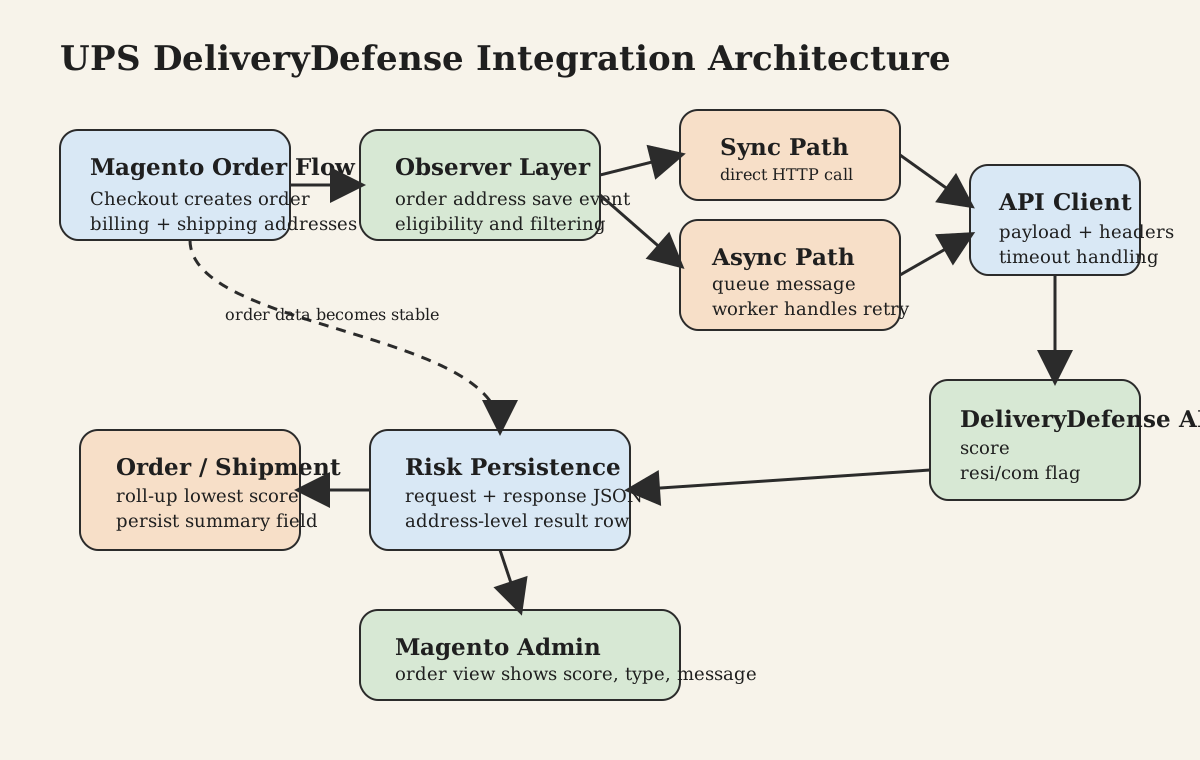
At a high level, the extension has four moving parts.
The first is configuration. The system configuration defines whether the integration is active, whether queueing is enabled, which endpoint should be used, and what credentials and fallback behavior apply in the current environment.
The second is event integration. The extension hooks into order-address save events, which is a stable point in the Magento sales flow. That timing matters. It means the extension runs after quote data has become order data, which keeps the API request grounded in a committed sales entity instead of a partially edited checkout state.
The third is transport and orchestration. A helper or service class decides whether the address should be sent at all, publishes to a queue when appropriate, performs the direct API call when needed, and updates order and shipment scores after the response is stored.
The fourth is visibility. The score is not left buried in logs or a side table. It is surfaced in the Magento order view, which is exactly where an operations user needs it.
Mermaid Architecture Diagram
graph TD
    A[Order address saved in Magento] --> B[Observer]
    B --> C{Queue enabled?}
    C -->|Yes| D[Queue message]
    D --> E[Worker / handler]
    C -->|No| F[Direct service call]
    E --> G[API client]
    F --> G
    G --> H[UPS DeliveryDefense / InsureShield-style endpoint]
    H --> I[Response mapper]
    I --> J[Risk result table]
    I --> K[Order delivery_defense_score]
    I --> L[Shipment delivery_defense_score]
    J --> M[Magento Admin order view]
API Flow Explanation
The API flow is intentionally narrow. The extension does not send the whole order. It sends just enough information for address-based delivery scoring.
The payload contains the street, city, state or region, and postal code. That keeps the integration aligned with the business purpose: address confidence and delivery risk, not general fraud analysis.
A typical payload looks like this:
{
  "street": "123 Main St",
  "city": "Austin",
  "state": "Texas",
  "zipCode": "78701"
}
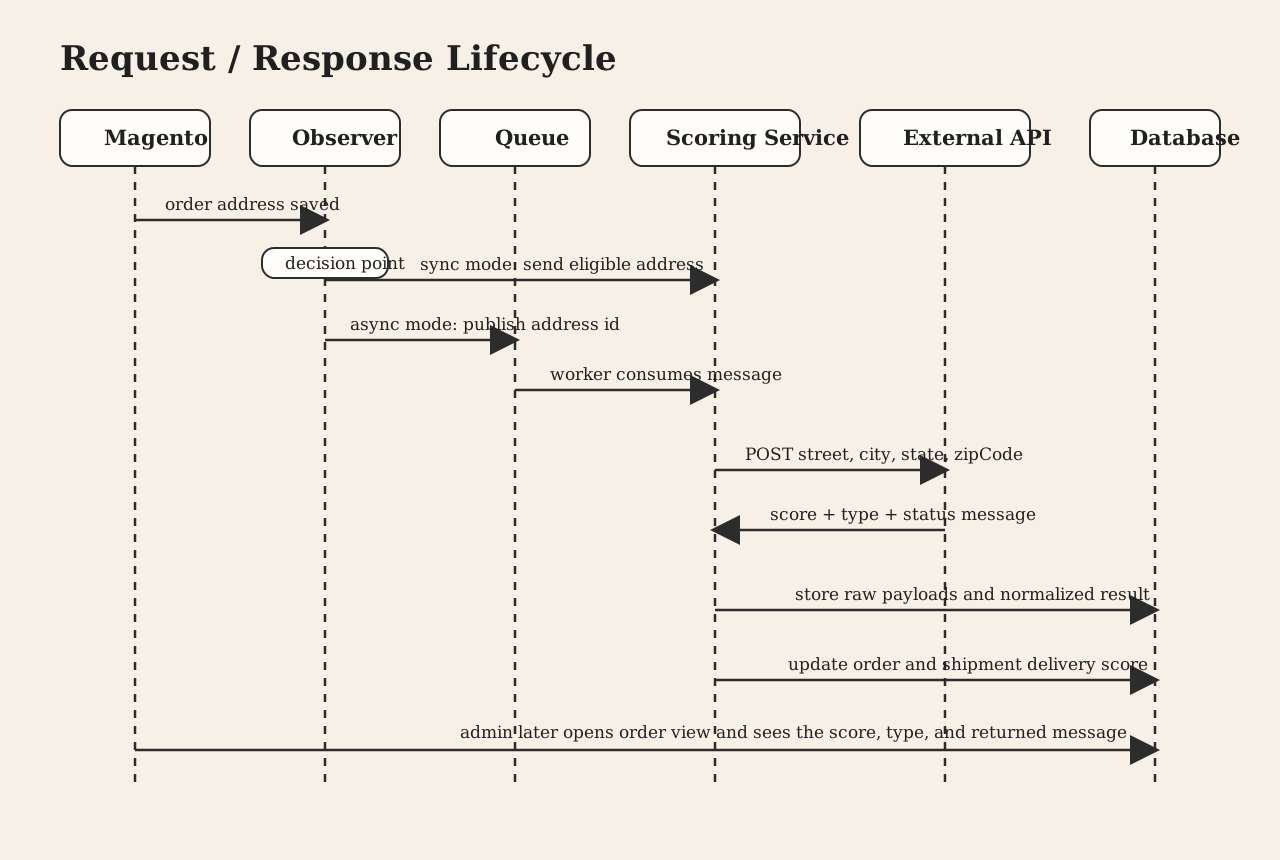
The request is sent as an HTTP POST with JSON, a partner identifier, and a bearer token. The client uses a request timeout so the order workflow does not hang indefinitely. If queueing is enabled, the request can be moved out of the storefront path. If not, the call runs synchronously and the result is available immediately after address processing.
The response is expected to contain a status block and a data block. The business fields that matter most are the score and the residential/commercial indicator. The extension stores those normalized fields, but it also stores the raw request and raw response JSON. That is not a cosmetic detail. It is what makes supportable integrations possible.
When the service is unavailable or returns an invalid payload, the extension does not fail silently. It persists a fallback message and marks the score with a sentinel value so operators and downstream rules can distinguish “low confidence score” from “no usable answer.”
Mermaid Sequence Diagram
sequenceDiagram
    participant Magento as Magento
    participant Obs as Observer
    participant Queue as Queue
    participant Worker as Worker
    participant Service as Scoring service
    participant API as External API
    participant DB as Database

    Magento->>Obs: order address saved
    Obs->>Obs: validate address and account filters
    alt async mode
        Obs->>Queue: publish address id
        Queue->>Worker: consume message
        Worker->>Service: score address
    else sync mode
        Obs->>Service: score address
    end
    Service->>API: POST address payload
    API-->>Service: score + type + status
    Service->>DB: save raw and normalized result
    Service->>DB: update order score
    Service->>DB: update shipment score
Order Lifecycle Integration
The most useful way to understand the extension is to follow the order itself.
The journey begins at checkout, where the customer enters billing and shipping details. Those values start life in the quote, but the integration does not act there. It waits until Magento creates and saves the order addresses. That choice reduces noise and avoids repeatedly scoring an address while the customer is still typing.
Once the order address is committed, the extension evaluates whether the address should be sent. In this implementation, the scoring is limited to supported countries and can be narrowed further through testing and exclusion rules. That makes rollout much easier in real stores, where internal orders, QA accounts, and edge-case flows can otherwise pollute the signal.
If the address passes those checks, the extension sends it to the external service either directly or through the queue. The returned result is stored against the address, including the score, the returned message, the address classification, and the full request and response payloads.
After that, the extension calculates an order-level score. If both billing and shipping have results, it uses the lower of the two. That is a pragmatic decision. In risk systems, the more conservative score is usually the right default for downstream operations.
Shipment handling is simpler. The extension does not perform a separate shipment-time API lookup. Instead, it propagates the already-computed order score to shipments so the fulfillment side of Magento can work with the same signal.
That gives the full flow a clean shape: quote becomes order, order addresses are scored, address scores roll up to the order, the order score propagates to shipments, and admin users see both the detailed per-address result and the summarized risk field.
Magento Admin Impact
For an extension like this, admin impact is where the technical work becomes operationally valuable.
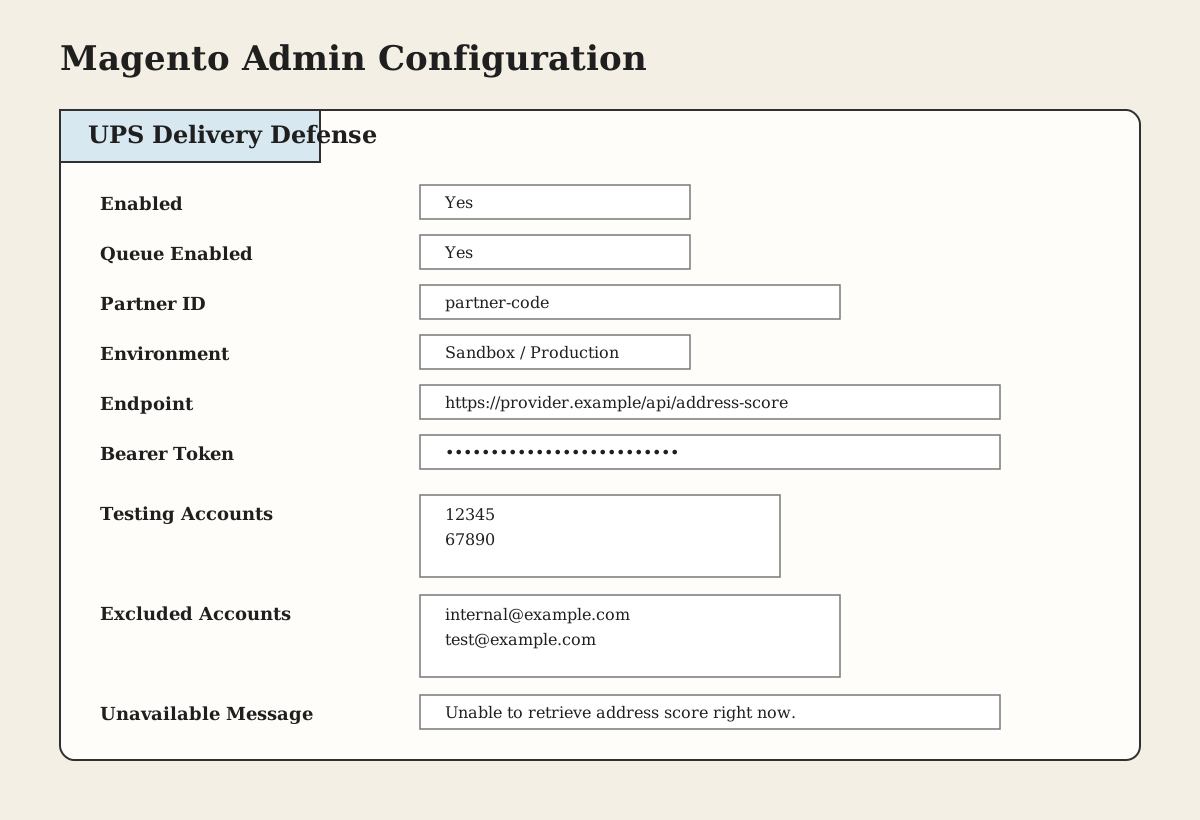
The configuration screen gives a merchant practical control over rollout and behavior. An admin can enable or disable the integration, decide whether queue processing should be used, switch between sandbox and production, update endpoint and token values, restrict testing to selected accounts, exclude internal accounts, and define the message shown when the service is unavailable.
That matters because external API integrations are rarely “set and forget.” Teams need a safe rollout path, observability, and a fallback mode.
Inside the order view, the extension adds delivery-defense information next to the billing and shipping sections. Rather than inventing a separate admin page, it puts the result where support, fraud, and fulfillment teams already spend their time. The operator can see the address, the returned score, the interpreted type, and the response message. The score is color-coded so a risky result is immediately visible without requiring someone to interpret raw numbers under pressure.
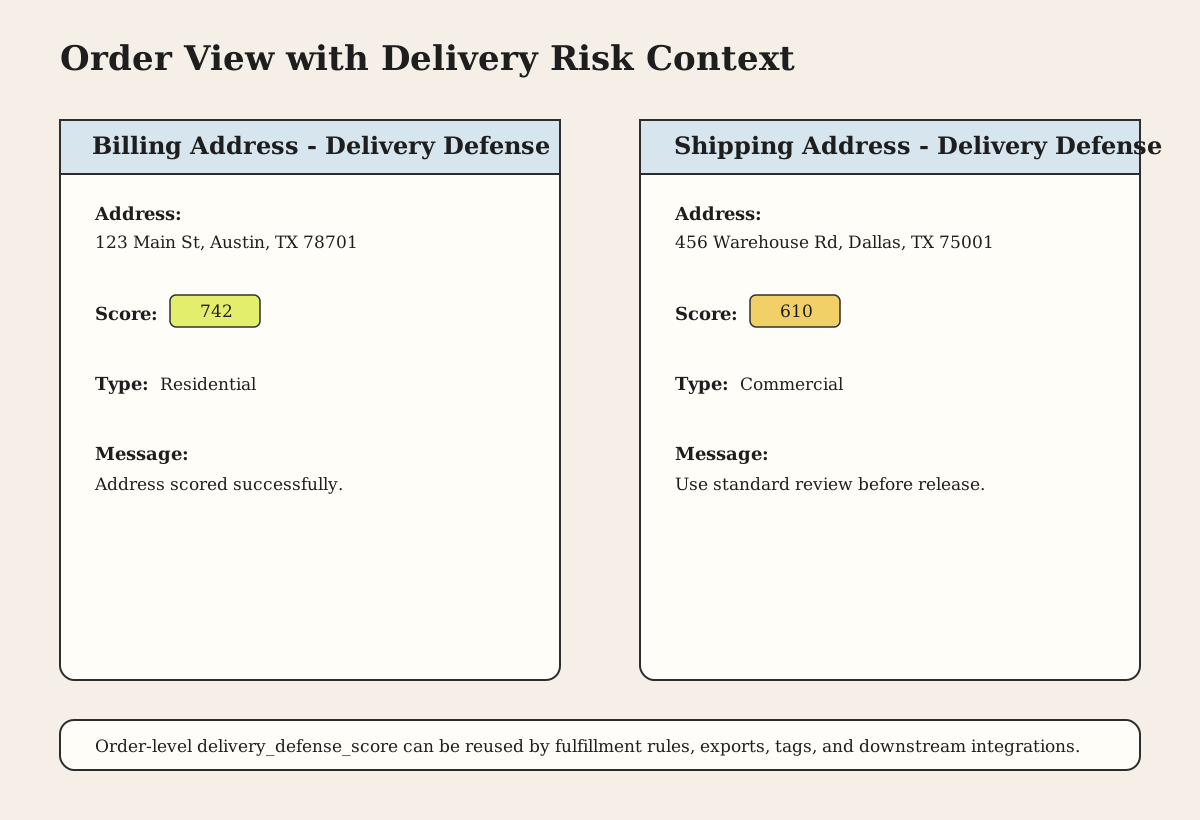
This is also where the difference between a technical integration and a useful integration becomes obvious. A background API call by itself does not improve operations. A visible score with context does.
The extension also writes to a dedicated log file when debugging is enabled and on error conditions. Combined with stored request and response JSON, that gives the team enough evidence to troubleshoot transport issues, mapping mistakes, or provider-side failures without guessing.
Platform-Agnostic Implementation: Magento 2, Laravel, Symfony
Although this implementation lives in Magento 1, the underlying pattern is not tied to Magento at all. This is really a PHP shipping protection integration pattern.
In Magento 2, the same design would naturally become an observer, plugin, or domain service triggered after order placement or address persistence. The API client would move behind a service contract. Queueing would use Magento’s built-in async infrastructure or RabbitMQ. The result could be stored in a custom table and exposed through extension attributes or a dedicated admin UI component. The architecture stays the same even though the framework changes.
In Laravel, the equivalent would look like a domain event fired after order creation, a queued job that scores the address, a Guzzle-based client, an Eloquent model for persistence, and an admin surface in Filament, Nova, or a custom back office. That makes this pattern directly relevant to any team building a Laravel external API order flow.
In Symfony, the same structure maps cleanly to Messenger, a dedicated application service, Symfony HttpClient or Guzzle, Doctrine entities for persistence, and an admin interface through EasyAdmin or a custom back office. That is why the same ideas apply well to Symfony order processing integration too.
What changes from platform to platform is the framework wiring. What does not change is the architecture: trigger on a stable business event, call the external service behind a clear abstraction, normalize the response, persist both raw and business-friendly data, and expose the result where humans and downstream automation can use it.
PHP Code Examples
The following examples are deliberately framework-neutral so they can be reused in Magento 2, Laravel, Symfony, or a custom PHP application.
Order Payload Builder
<?php

final class OrderAddressPayloadBuilder
{
    public function build(Address $address): array
    {
        return [
            'street' => $address->street,
            'city' => $address->city,
            'state' => $address->region,
            'zipCode' => $address->postalCode,
        ];
    }
}
API Client with Timeout and Error Handling
<?php

use GuzzleHttp\ClientInterface;
use Psr\Log\LoggerInterface;

final class DeliveryDefenseApiClient
{
    public function __construct(
        private ClientInterface $http,
        private LoggerInterface $logger,
        private string $endpoint,
        private string $partnerId,
        private string $bearerToken,
    ) {}

    public function scoreAddress(array $payload): array
    {
        try {
            $response = $this->http->request('POST', $this->endpoint, [
                'headers' => [
                    'Content-Type' => 'application/json',
                    'partnerId' => $this->partnerId,
                    'bearer' => $this->bearerToken,
                ],
                'json' => $payload,
                'timeout' => 5.0,
                'connect_timeout' => 2.0,
            ]);

            return json_decode((string) $response->getBody(), true, 512, JSON_THROW_ON_ERROR);
        } catch (\Throwable $e) {
            $this->logger->error('DeliveryDefense request failed', [
                'endpoint' => $this->endpoint,
                'payload' => $payload,
                'exception' => $e,
            ]);

            throw new RuntimeException('DeliveryDefense API call failed', 0, $e);
        }
    }
}
Response Mapper
<?php

final class DeliveryDefenseResult
{
    public function __construct(
        public readonly ?int $score,
        public readonly string $type,
        public readonly string $message,
        public readonly bool $available,
        public readonly array $raw,
    ) {}
}

final class DeliveryDefenseResponseMapper
{
    public function map(array $response): DeliveryDefenseResult
    {
        $score = $response['data']['score'] ?? -1;
        $type = $response['data']['resiComFlag'] ?? '';
        $message = $response['status']['message'] ?? 'Service unavailable';

        return new DeliveryDefenseResult(
            score: is_numeric($score) ? (int) $score : -1,
            type: (string) $type,
            message: (string) $message,
            available: isset($response['status']),
            raw: $response,
        );
    }
}
Service Layer
<?php

final class DeliveryDefenseScoringService
{
    public function __construct(
        private OrderAddressPayloadBuilder $payloadBuilder,
        private DeliveryDefenseApiClient $client,
        private DeliveryDefenseResponseMapper $mapper,
        private DeliveryDefenseRepository $repository,
    ) {}

    public function scoreOrderAddress(Order $order, Address $address, string $addressType): DeliveryDefenseResult
    {
        $payload = $this->payloadBuilder->build($address);
        $response = $this->client->scoreAddress($payload);
        $result = $this->mapper->map($response);

        $this->repository->storeAddressResult(
            orderId: $order->id,
            addressId: $address->id,
            addressType: $addressType,
            requestPayload: $payload,
            result: $result,
        );

        $this->repository->updateOrderScore(
            orderId: $order->id,
            score: $this->repository->calculateLowestOrderScore($order->id),
        );

        return $result;
    }
}
Logging and Fallback Strategy
<?php

use Psr\Log\LoggerInterface;

final class SafeScoringService
{
    public function __construct(
        private DeliveryDefenseScoringService $service,
        private LoggerInterface $logger,
    ) {}

    public function scoreOrFallback(Order $order, Address $address, string $addressType): DeliveryDefenseResult
    {
        try {
            return $this->service->scoreOrderAddress($order, $address, $addressType);
        } catch (\Throwable $e) {
            $this->logger->warning('Falling back after scoring failure', [
                'order_id' => $order->id,
                'address_id' => $address->id,
                'address_type' => $addressType,
                'exception' => $e,
            ]);

            return new DeliveryDefenseResult(
                score: -1,
                type: '',
                message: 'Unable to retrieve delivery risk score at this time.',
                available: false,
                raw: [],
            );
        }
    }
}
Risks and Lessons Learned
A shipping-risk integration like this looks simple on the surface, but a few implementation choices make all the difference.
The first lesson is timing. Triggering on persisted order addresses is usually a better operational choice than trying to score every in-progress checkout mutation. It reduces API noise and ties the result to a committed sales object.
The second lesson is payload discipline. A small payload is easier to reason about, easier to secure, and easier to migrate across platforms. If the business question is “how risky is this delivery destination,” then address-only scoring is often the cleanest design.
The third lesson is observability. Persisting request and response JSON, storing a normalized score, and logging transport failures gives the integration a real support story. Without that, every incident turns into guesswork.
The fourth lesson is admin usability. The score has to live where a human can act on it. That is why the Magento Admin order view matters as much as the API client.
There are also a few engineering caveats worth calling out in any modern implementation. SSL verification should stay enabled. Database updates should go through the right persistence layer unless there is a deliberate performance reason not to. Queue semantics should match the message transport being used. Configuration defaults should be explicit and safe. And fallback states such as “API unavailable” should be represented clearly so business rules do not confuse missing data with a legitimate low-risk or high-risk score.
Conclusion
A good UPS DeliveryDefense integration is not really about vendor branding. It is about building a dependable order-enrichment pipeline.
An order enters the system. Its address is scored. The response is stored. The result becomes visible to operators and reusable for downstream shipping decisions. That is the real pattern, and it is a strong example of Magento API integration architecture done in a way that can be carried forward into Magento 2, Laravel, Symfony, or any PHP application.
If you are designing a Magento shipping protection integration today, that is the bar worth aiming for: minimal payload, clear service boundaries, safe failure handling, durable persistence, and admin visibility that turns API output into operational value.
Appendix
The pattern described here usually includes:
- module declaration
- configuration for models, observers, defaults, and queue transport
- admin configuration fields
- an observer for order-address persistence
- a service layer for orchestration
- an API client for the outbound HTTP call
- a persistence model for raw and normalized results
- admin order view rendering for billing and shipping risk details
The same structure adapts cleanly to Magento 2, Laravel, and Symfony with framework-specific equivalents for events, queues, HTTP clients, persistence, and admin UI.