GoDataFeed Order Sync in Magento 2: A Practical Pattern for Importing Marketplace Orders and Pushing Shipment Status Back
Introduction
If you sell through marketplaces, the hard part is usually not getting more orders. The hard part is keeping your commerce platform aligned with what happened outside of it.
That is exactly where a connector such as GoDataFeed becomes useful.
GoDataFeed is a multichannel feed and marketplace operations platform. In practice, that means it helps merchants and agencies move catalog data across channels, keep listings compliant, and coordinate operational data such as orders, inventory, and status updates between selling channels and the commerce platform behind them.
This article focuses on the order side of that problem.
The Magento 2 module behind this implementation pulls marketplace orders from GoDataFeed, converts them into native Magento orders, preserves marketplace metadata for support teams, and later pushes shipment status and tracking data back to GoDataFeed when fulfillment happens in Magento.
That makes it a useful real-world pattern for:
Magento 2 marketplace order integrationGoDataFeed Magento integrationmarketplace order sync PHPMagento order import architectureshipment status sync Magento
And although this implementation lives in Magento 2, the architectural pattern also maps well to Laravel, Symfony, or any PHP commerce backend that needs reliable marketplace order orchestration.
Business Context
Marketplace integrations are rarely just “API in, API out.”
A real implementation has to answer several operational questions:
- how to authenticate safely against the upstream platform
- how to pull only the order window you actually need
- how to prevent duplicate imports
- how to map marketplace payment and shipping semantics into Magento
- how to preserve the upstream identifiers for support and reconciliation
- how to acknowledge that an order has been accepted downstream
- how to send shipment status back once fulfillment occurs
That is the problem this module solves.
Instead of treating marketplace orders as second-class data, it gives them a proper lifecycle inside Magento. The imported order becomes a native sales order, gets its own invoice, carries marketplace metadata directly on the entity, appears in admin grids with marketplace columns, and remains linked closely enough to the source platform that shipment updates can flow back later.
What the Integration Does
At a high level, the module acts as a two-way bridge between GoDataFeed and Magento.
On the inbound side, it authenticates against the GoDataFeed API, requests orders within a configured date range, loops through each returned order, checks whether the marketplace order source number already exists in Magento, and only creates a new order if the import is genuinely new.
During import, the module:
- creates a guest Magento order
- maps marketplace customer data into Magento billing and shipping addresses
- resolves a Magento region when state data is available
- assigns a dedicated marketplace payment method
- assigns a dedicated marketplace shipping method
- builds order items from marketplace SKUs and line-item pricing
- stores tax, discount, subtotal, shipping, and grand-total data directly on the order
- persists GoDataFeed-specific metadata on the
sales_orderrecord - automatically creates an offline invoice
If the upstream order did not yet have a destination order number, the integration then acknowledges the order back to GoDataFeed using the newly created Magento increment ID.
On the outbound side, once a shipment is saved in Magento Admin, the module detects that the order originated in GoDataFeed, reads the tracking information from the shipment tracks, and sends an order-status update back to GoDataFeed so the marketplace-facing system stays aligned with Magento fulfillment.
That end-to-end loop is the real value here. It is not just an importer. It is a marketplace order synchronization pattern.
Architecture Overview
What makes this implementation useful is its separation into a few clear responsibilities.
Configuration lives in Magento system config, where an administrator can enable the integration, set the API URL, provide the consumer key, toggle debug logging, and define manual sync windows such as page, page size, from date, and to date.
The transport layer is responsible for authentication, order retrieval, order acknowledgment, and shipment-status updates against the GoDataFeed API.
The domain layer converts an upstream order payload into a native Magento order. That includes customer identity, addresses, shipping method, payment method, items, totals, tax rows, invoices, and marketplace metadata persistence.
The admin layer surfaces marketplace fields in the Magento order grid and order view so support teams can see where the order came from and how it maps back to the external system.
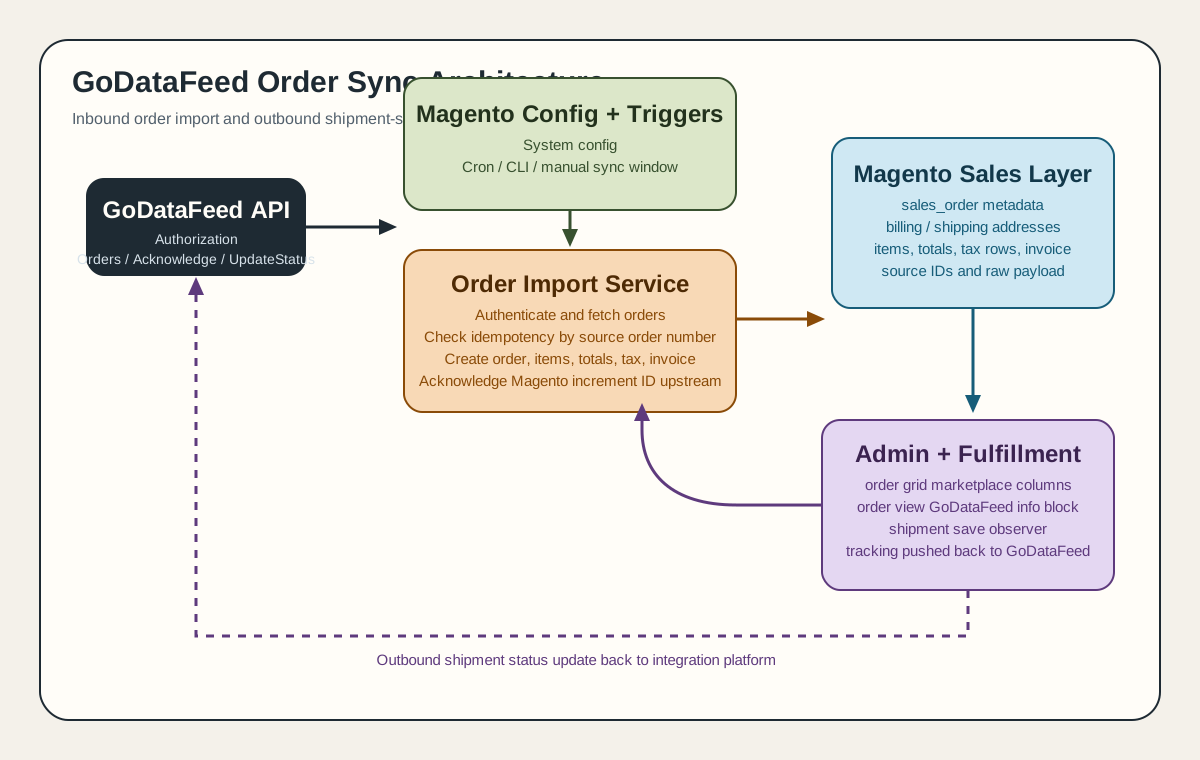
Mermaid Architecture Diagram
graph TD
    A[GoDataFeed API] --> B[Authentication]
    B --> C[Orders endpoint]
    C --> D[Cron or CLI sync]
    D --> E[Order import service]
    E --> F{Already imported?}
    F -->|Yes| G[Skip duplicate]
    F -->|No| H[Create Magento order]
    H --> I[Billing and shipping addresses]
    H --> J[Marketplace payment and shipping mapping]
    H --> K[Items, totals, tax, invoice]
    H --> L[Persist GoDataFeed metadata on sales_order]
    L --> M[Magento Admin grid and order view]
    H --> N[Acknowledge order back to GoDataFeed]
    O[Shipment saved in Magento] --> P[Shipment observer]
    P --> Q[Tracking and carrier extraction]
    Q --> R[UpdateStatus back to GoDataFeed]
What GoDataFeed Is in This Context
It helps to be precise here, because “feed management platform” can sound narrower than the implementation actually is.
GoDataFeed is best understood as a product-data and channel-operations layer that sits between the merchant catalog and the external channels where products are sold. Its platform handles feed formatting, channel mapping, compliance checks, and synchronization workflows across marketplaces and advertising channels. In this module, that broader platform role shows up specifically as an order exchange point: Magento is not polling Amazon or eBay directly. It is integrating against GoDataFeed as the intermediary operational system.
That architectural choice has practical advantages.
It reduces the need for channel-specific order import logic inside Magento, centralizes marketplace communication in one external platform, and gives the commerce backend a single integration surface instead of a separate custom connector for every marketplace.
API Flow Explanation
The API flow is straightforward but operationally important.
First, the integration authenticates with GoDataFeed using a configured consumer key. The API returns a token, and that token becomes part of the request path for subsequent order operations.
The orders request then pulls a date-bounded set of marketplace orders. In cron or CLI mode, the code defaults to a rolling window of the last five days with a page size of ninety-nine. In manual admin-driven sync mode, it uses the values entered in system configuration. That is a useful design detail because it supports both automated background sync and controlled replays for operations teams.
For each order payload:
- the integration checks for an existing Magento order by
godatafeed_ordersourcenumber - if found, the import is skipped
- if not found, a Magento order is created and enriched with GoDataFeed metadata
- if no destination order number exists upstream, Magento acknowledges the order back to GoDataFeed with its increment ID
Later, when a Magento shipment is saved, the reverse flow begins:
- the observer confirms the order has a stored
godatafeed_orderid - the integration authenticates again
- shipment tracks are inspected for tracking number, carrier code, and shipped date
- the order status is pushed back to GoDataFeed as
Shipped
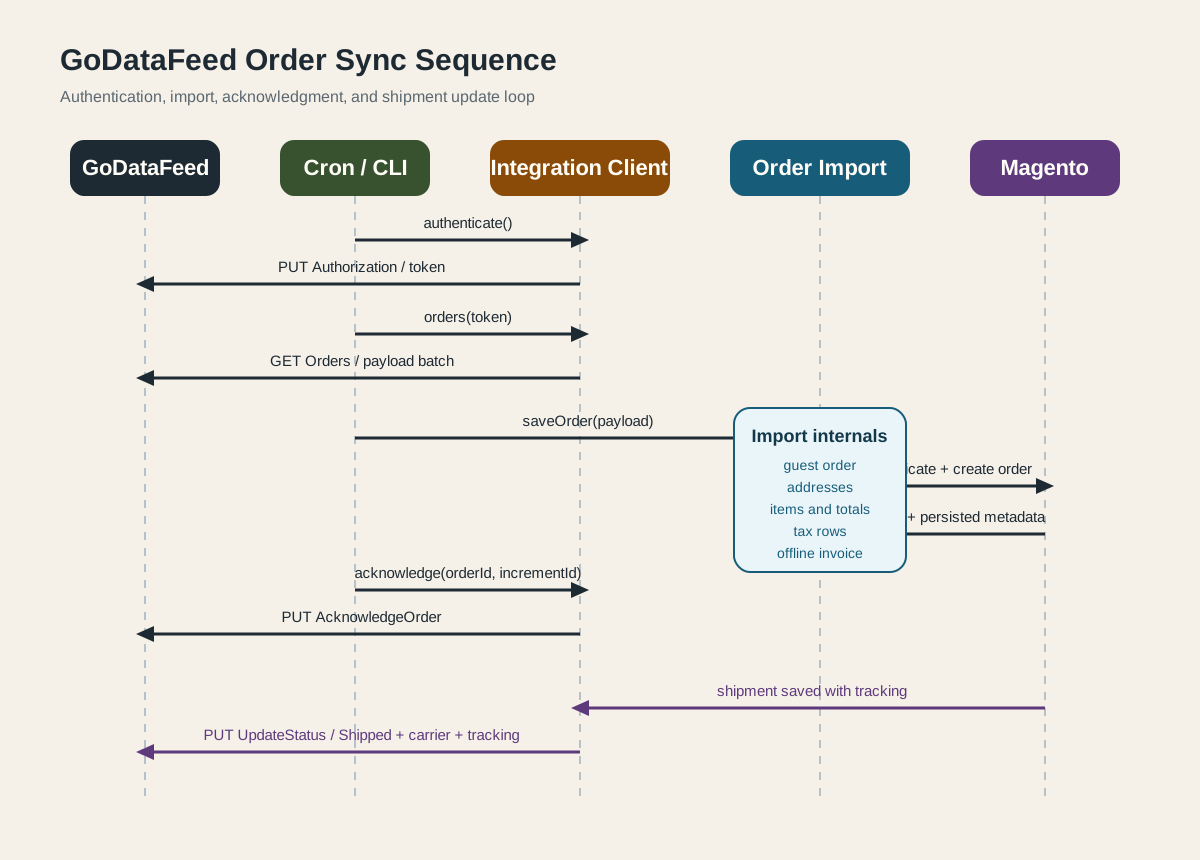
Mermaid Sequence Diagram
sequenceDiagram
    participant GDF as GoDataFeed
    participant Cron as Cron or CLI
    participant API as Integration client
    participant Import as Magento order importer
    participant DB as Magento sales tables
    participant Admin as Magento Admin
    participant Ship as Shipment observer

    Cron->>API: authenticate()
    API->>GDF: PUT Authorization
    GDF-->>API: token
    Cron->>API: orders(token)
    API->>GDF: GET Orders
    GDF-->>API: marketplace orders

    loop each order
        Cron->>Import: saveOrder(payload)
        Import->>DB: check by source order number
        alt new order
            Import->>DB: create order, items, totals, invoice
            Import->>DB: persist GoDataFeed metadata
            Cron->>API: acknowledge(token, orderId, incrementId)
            API->>GDF: PUT AcknowledgeOrder
        else duplicate
            Import-->>Cron: skip
        end
    end

    Admin->>DB: create shipment
    DB->>Ship: shipment save event
    Ship->>API: update(token, orderId, Shipped, tracking, date, carrier)
    API->>GDF: PUT UpdateStatus
Magento Order Creation Pattern
The order import logic is the most interesting part of the module, because it does not go through a storefront quote flow. It constructs the sales order directly from the marketplace payload.
That means the service has to do more explicit work than a normal checkout would.
It initializes the order as a guest checkout record, locks currency values to USD, and applies a dedicated marketplace payment method and shipping method. Customer identity is represented as guest order data rather than a linked Magento customer account, which is usually the right default for marketplace-originated orders.
Address handling is also explicit. The integration takes the upstream name, company, street, city, postal code, country, and phone data and maps it directly into Magento billing and shipping addresses. When a state or province value exists, it attempts to resolve a Magento region ID for the US context. That is a practical touch, because region mismatches are a common failure point in imported order flows.
Line items are then created from the incoming order items. For each item, the module:
- resolves the product by SKU when possible
- falls back gracefully if the SKU is missing in the catalog
- sets ordered quantity, item price, row totals, discounts, and tax values
- computes a row-level tax percentage from the upstream tax amount
Totals are then applied directly at order level, including subtotal, grand total, shipping amount, shipping tax, tax totals, and paid totals. After the order is saved, the module also creates tax records and an offline invoice.
This matters because many marketplace integrations stop at “order created.” This one goes further and creates a more operationally complete Magento order state that accounting and fulfillment teams can work with immediately.
Metadata Persistence and Admin Visibility
One of the strongest decisions in this module is that it does not bury marketplace context in logs alone.
The schema extends sales_order and sales_order_grid with dedicated GoDataFeed columns such as:
- source channel
- source status
- buyer identifier
- upstream order ID
- source order number
- destination order number
- payment transaction ID
- payment type
- raw serialized payload
That design has two benefits.
First, it makes the imported order traceable. Support teams can reconcile a Magento order with the upstream marketplace order without hunting through external systems or log files.
Second, it makes the integration operationally visible. The Magento admin grid gets marketplace columns, and the order view includes a dedicated GoDataFeed information block showing source, statuses, identifiers, and payment metadata.
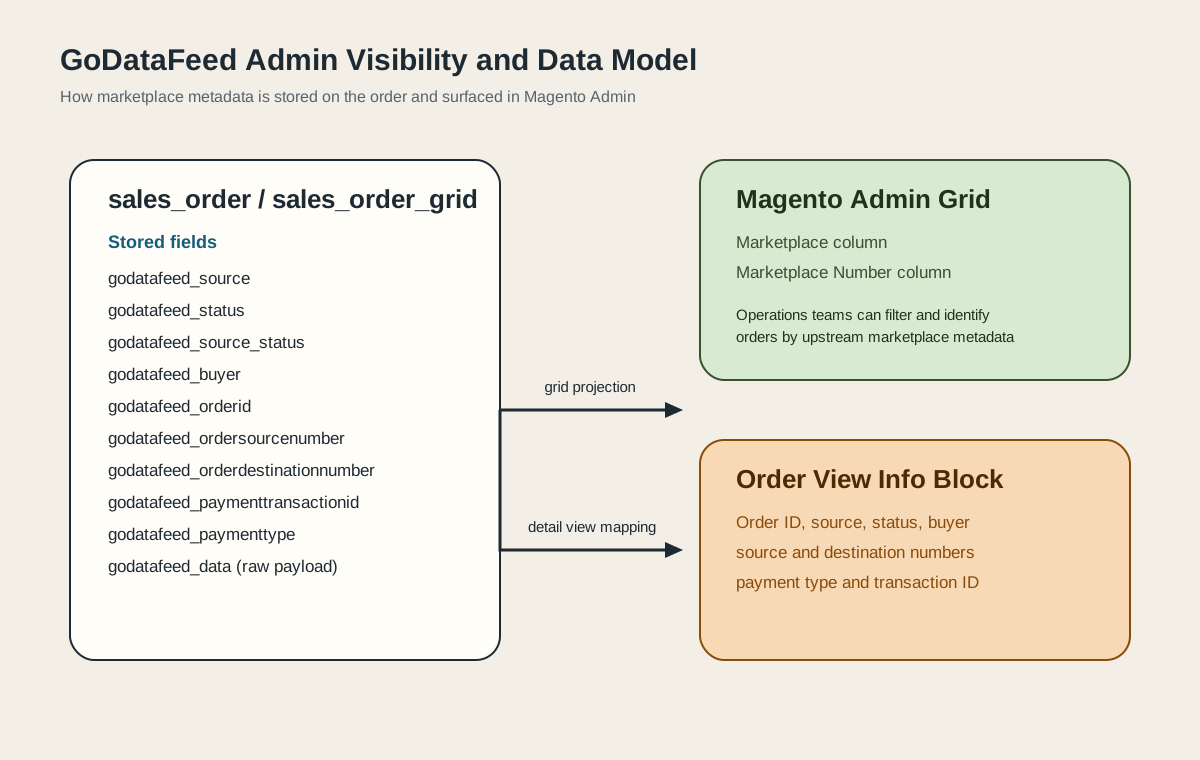
This is exactly the kind of detail that turns an API integration into something supportable in production.
Shipment Sync Back to GoDataFeed
The outbound sync is triggered from a shipment-save observer in Magento Admin.
That is an important architectural choice. The module does not guess when the order has shipped. It uses the shipment entity as the source of truth. Once a shipment exists, the observer reads the order, confirms the order originated from GoDataFeed, authenticates against the upstream API, extracts tracking information from shipment tracks, and pushes a status update back to GoDataFeed.
The payload includes:
- order status
- shipment tracking number
- shipped date
- carrier code
This keeps Magento as the fulfillment system of record while still letting the upstream marketplace integration layer know that the order moved to the shipped state.
For marketplace operations, that closes the loop. Without this step, imports would work, but fulfillment state would drift between systems.
Operational Characteristics
Several practical traits make this implementation production-friendly.
The first is idempotency at import time. The module checks the marketplace source order number before creating anything, which is the minimum protection every order-import integration should have.
The second is dual execution mode. The same core flow can run from cron for automatic background sync or from CLI/admin paths for manual control. That is useful when support teams need to replay a date window or inspect a specific batch.
The third is debug support. The integration can log request and response details for authentication, order retrieval, acknowledgment, and update calls. For external API integrations, that kind of transport-level visibility is not optional. It is what makes failures diagnosable.
The fourth is upstream acknowledgment. After Magento successfully creates the order, the integration sends the Magento increment ID back to GoDataFeed when needed. That prevents the import from being a one-way blind copy. It creates an explicit linkage between upstream and downstream order identities.
Risks and Improvements I Would Make Next
The architecture is solid, but several improvements would raise the bar further.
The HTTP client layer should move away from raw cURL calls into a dedicated client abstraction with explicit timeouts, structured exceptions, and cleaner response validation.
The import flow would benefit from stronger product validation and clearer handling when a SKU does not exist locally. Right now the code falls back to an empty product model, which keeps the flow moving but deserves tighter guardrails in a production-hardening pass.
The observer that pushes shipment status back should be a bit more defensive around remote payload handling and status checks. Shipment synchronization is the kind of thing that should fail loudly and predictably, not silently.
I would also move long-running import and update work behind a queue if order volume grows. Today’s synchronous flow is understandable and practical, but queue-backed execution would make retries, dead-letter handling, and rate-limit resilience cleaner.
Those are implementation refinements, not architectural corrections. The core pattern remains strong.
Platform-Agnostic Implementation: Magento 2, Laravel, Symfony
Even though this module is Magento 2 specific, the pattern itself is portable.
In Laravel, the equivalent would likely be a scheduled job that authenticates against GoDataFeed, fetches orders for a bounded window, hands each payload to an order-import service, stores external IDs on the order model, and dispatches shipment-status updates when fulfillment events occur.
In Symfony, the same design would map naturally to Messenger handlers, an application service for order creation, Doctrine entities with external-reference fields, and event subscribers on shipment or fulfillment state changes.
In every stack, the architecture stays the same:
- authenticate to the upstream integration platform
- pull orders by controlled window
- enforce idempotency
- map external semantics into local order entities
- preserve external identifiers on the local model
- acknowledge successful downstream creation
- push shipment status back when fulfillment occurs
That is why this implementation is useful beyond Magento. It is a good example of how to design a marketplace order bridge that operations teams can actually rely on.
Final Thoughts
The interesting part of this module is not that it “connects Magento to GoDataFeed.” Plenty of integrations can say that.
The interesting part is that it treats marketplace orders as first-class operational entities inside Magento while still preserving the synchronization contract with the upstream platform.
That is the right way to think about this kind of work.
Not as a feed feature. Not as a one-off importer. But as a reliable order orchestration layer between channel operations and the commerce backend that ultimately fulfills the order.