MarketTime Magento 1 CSV Order Import: Building a Reliable B2B Wholesale Integration
Introduction
Many B2B commerce integrations are not built around modern APIs. They are built around files.
That is not always a weakness. In wholesale environments, CSV exchange is still common because sales platforms, ERP systems, fulfillment teams, and legacy commerce backends often need a predictable format that can be reviewed, replayed, archived, and moved through SFTP or another controlled file-delivery process.
This article looks at a practical MarketTime Magento 1 CSV order import pattern.
MarketTime is a B2B wholesale platform used by brands, sales agencies, and retailers to support wholesale ordering, product discovery, and buyer relationships. Its B2B commerce offering helps sellers provide wholesale ordering experiences for approved retailers and sales teams. You can also read more on the official MarketTime B2B eCommerce page.
This is a generalized technical article. It does not describe any private client system, proprietary codebase, internal module, file path, database schema, or confidential implementation detail. The examples and diagrams are simplified illustrations based on common B2B commerce integration requirements and public platform concepts.
In this pattern, there is no direct API connection. The exchange relies on CSV files as the integration format. Order data is received as files, parsed, validated, transformed, and imported into Magento 1 as native orders.
That makes it a useful real-world pattern for:
MarketTime Magento integrationMagento 1 CSV order importB2B wholesale order importMagento file based integrationlegacy Magento integrationCSV order processing PHP
The interesting part is not the CSV format itself. The interesting part is how a file-based integration turns external order rows into reliable Magento order data without creating duplicates, losing line items, or hiding failures from operations teams.
Business Context
Wholesale order flows are different from standard storefront checkout.
Orders may originate from sales reps, showrooms, trade shows, external B2B portals, or buyer-facing wholesale systems. By the time the order reaches Magento, it already has business context attached to it: a purchase order number, retailer information, billing and shipping addresses, payment terms, shipping instructions, line-item pricing, discounts, notes, and sometimes additional customer-specific metadata.
Magento still has to treat the result like a real order.
That means a file-based integration has to answer a few practical questions:
- Which CSV rows belong to the same order?
- What external identifier should be used to prevent duplicates?
- How should payment terms map to Magento payment methods?
- How should shipping methods map to Magento shipping methods?
- What happens when customer or address data is incomplete?
- How are notes and special instructions preserved?
- How should invalid rows be reported?
- Can large batches run without timing out?
Those questions are where a simple file import becomes a production integration.
What This Pattern Does
At a high level, this pattern imports MarketTime-style order CSV files into Magento 1.
Each CSV file contains order-level fields and line-item fields. In a common wholesale export format, one row represents one line item, while order-level values such as purchase order number, customer name, billing address, and shipping address are repeated across rows.
The import process reads those rows, groups them by purchase order number, maps each row into a Magento order import structure, and then creates the corresponding Magento order.
During import, this type of implementation usually handles:
- order grouping by external purchase order number
- SKU and quantity mapping
- custom item pricing and discount handling
- billing and shipping address mapping
- retailer or account resolution when required by the business model
- fallback handling when a direct customer match is not available
- payment method mapping from external payment terms
- shipping method mapping from external shipping values
- customer notes and special instructions
- external order reference storage
- duplicate detection before order creation
The result is a native Magento order that can be reviewed, fulfilled, invoiced, and supported by the existing back-office workflow.
CSV-Based Architecture
The architecture is intentionally file-based.
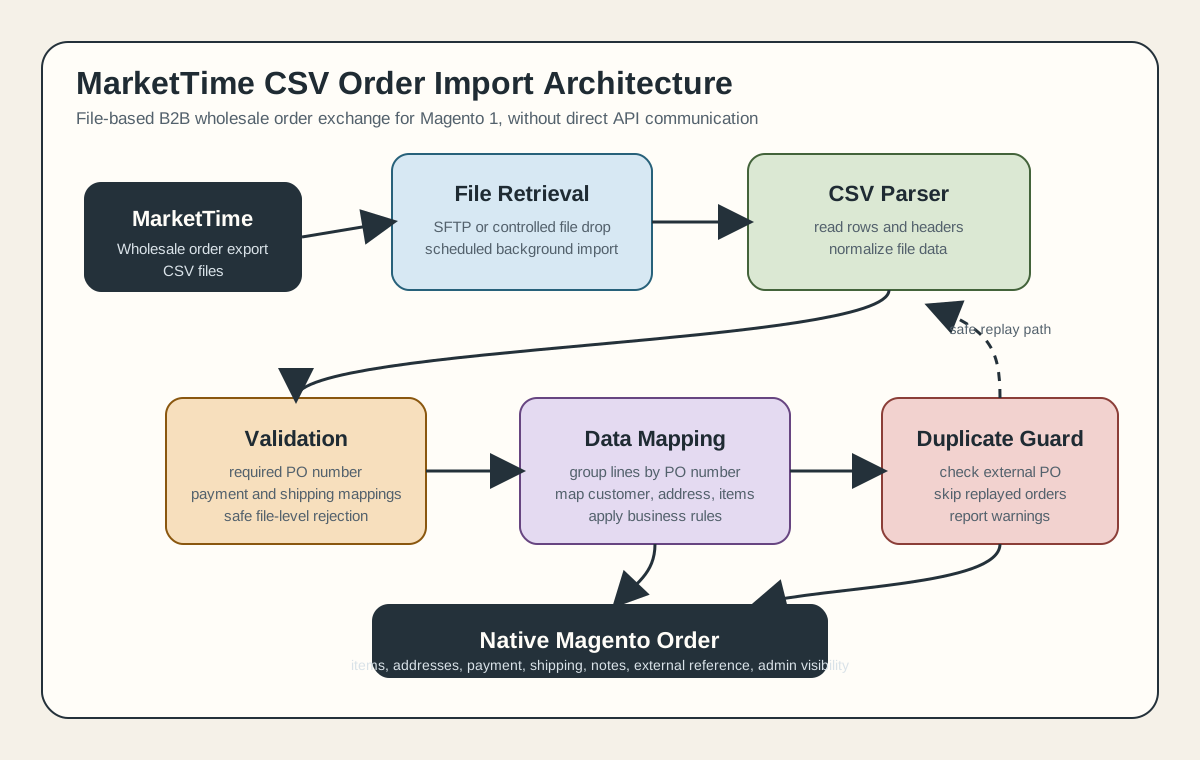
MarketTime-style order data can be exchanged as CSV. The commerce system receives those files through a configured file connection, reads the available CSV files, parses their contents, and passes the normalized rows into the order import pipeline.
That flow is simple to describe but important to implement carefully.
graph TD
    A[MarketTime order export] --> B[CSV files]
    B --> C[File connection]
    C --> D[CSV parser]
    D --> E[Validation]
    E --> F[Group rows by PO number]
    F --> G[Map fields to Magento order data]
    G --> H{Already imported?}
    H -->|Yes| I[Skip duplicate]
    H -->|No| J[Create Magento order]
    J --> K[Store external order reference]
    J --> L[Log success or error]
The separation of responsibilities matters.
The file layer is responsible for retrieving CSV files. The parser is responsible for turning file contents into rows. The validation layer rejects unsafe data before import. The mapping layer transforms external values into Magento order fields. The order layer creates the Magento order using the same business rules that the rest of the system expects.
That separation keeps the integration easier to support. If a file cannot be read, that is a transport problem. If a row is missing a purchase order number, that is a data-quality problem. If a payment term does not map to a Magento method, that is a configuration problem. Those failures should not all look the same.
Why Purchase Order Grouping Matters
The purchase order number is the core identity of the import.
In a line-item CSV export, the same order may appear across several rows. Each row has a different item, quantity, price, or line sequence, but the rows share the same purchase order number. The importer has to group those rows into one order before Magento can create the correct order structure.
This is also the most natural duplicate-prevention key.
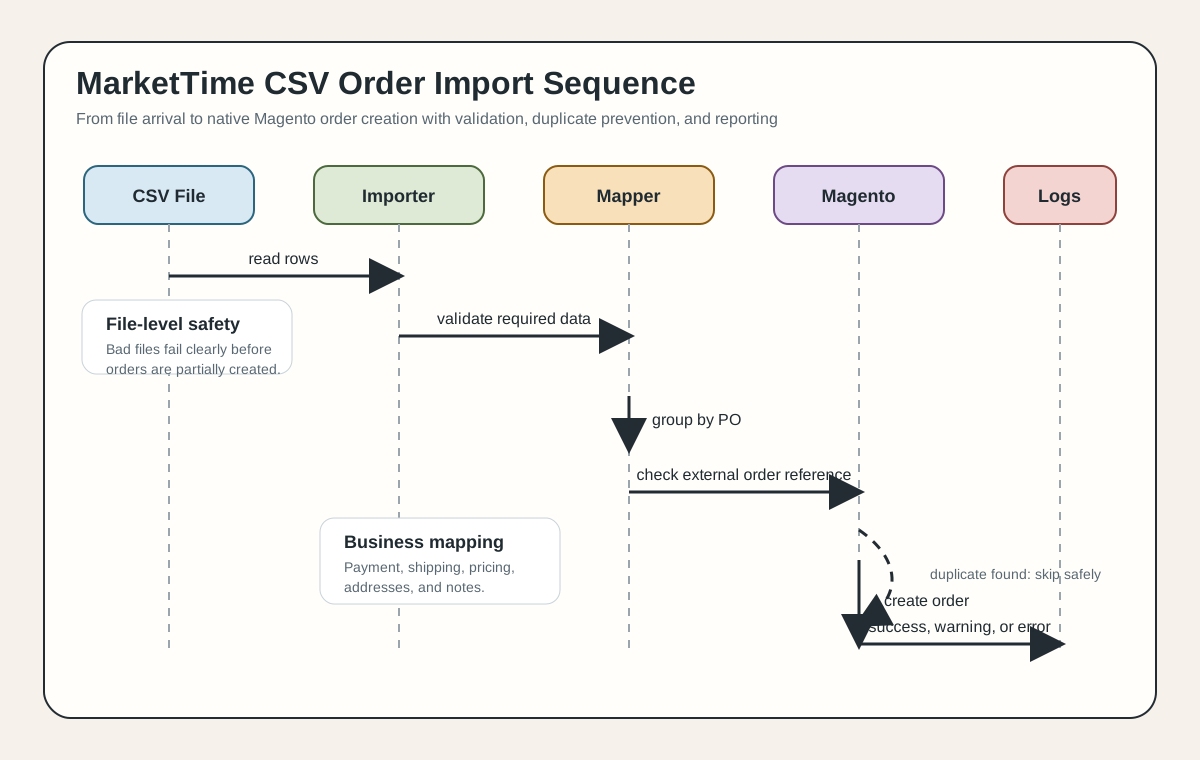
Before creating an order, the importer checks whether an order with the same external purchase order number already exists. If it does, the importer skips that purchase order instead of creating another Magento order.
That idempotency is essential in file-based integrations.
CSV files may be replayed during testing. A scheduled import may be restarted. A file may remain in the source directory longer than expected. An administrator may manually run the import after a partial failure. Without duplicate prevention, any of those cases can create duplicate orders.
A reliable import treats replay as normal. It should be safe to process the same file again.
Validation Before Order Creation
The safest import is the one that refuses bad data early.
One example is a missing purchase order number. If a row has no PO number, the importer cannot know which order that line item belongs to. Importing the rest of the file while silently dropping or misplacing that row would be worse than failing clearly.
For that reason, the integration validates required values before order creation begins. If a file contains rows that cannot be safely grouped, the file is rejected with a clear error.
Configuration is also validated before import. A B2B order import usually needs a default account context, payment mappings, and shipping mappings. If those are missing, the system should not guess. It should stop and tell the operator what needs to be configured.
Good validation protects three things:
- order accuracy
- data consistency
- operator trust
If the import says an order was created, the operations team should not have to wonder whether some line items were silently ignored.
Data Mapping and Business Rules
CSV integration work is mostly mapping work.
External systems do not speak Magento's internal language. A wholesale order file may contain item identifiers, quantities, pricing, discounts, payment terms, shipping labels, billing data, shipping data, retailer information, notes, and fulfillment instructions. Magento expects order items, addresses, payment method codes, shipping method codes, customer or account context, totals, and order metadata.
The integration layer bridges that gap.
Typical transformations include:
- mapping external item identifiers to Magento SKUs
- mapping quantity into ordered quantity
- calculating custom item price from unit price and item discount
- splitting full names into first and last name fields
- mapping billing and shipping address fields
- choosing a contact email fallback
- mapping payment terms to configured payment methods
- mapping shipping labels to configured shipping methods
- combining notes and special instructions into order comments
- preserving the original purchase order number as an external reference
These rules are business logic, not just technical glue.
For example, payment terms coming from a wholesale system may not match Magento payment method codes. Shipping labels may be written for humans, while Magento needs an internal carrier and method code. Discounts may already be reflected at item level and should not be applied twice. Notes may contain fulfillment instructions that need to be visible to admin users but not exposed as customer-facing messages.
Those are exactly the details that decide whether an integration is usable in production.
Error Handling and Logging
File-based imports need strong operator feedback.
When an import runs, the admin or support team needs to know which files were processed, which orders were created, which orders were skipped as duplicates, and which rows failed validation. Generic failure messages are not enough.
A useful integration should report:
- file-level errors
- row-level validation problems
- duplicate order skips
- successful imported order references
- timing information for slow imports
- exceptions from the order creation process
Logging is also important because CSV imports are often scheduled. If a cron process runs overnight and fails on one file, the next person investigating the issue needs enough detail to understand whether the problem was the file, the configuration, the catalog, or Magento itself.
The best logging is not just verbose. It is specific.
An error such as "row missing PO number" is useful. An error such as "import failed" is not. A warning that an order was already imported is useful. Treating that as a fatal error is not.
Performance and Large Batches
Large CSV imports should not depend on an admin browser request.
Manual buttons are useful for smoke testing small files, but production imports should run through scheduled background processing. Magento 1 order creation can be slow because creating an order may touch products, addresses, totals, payment logic, shipping logic, observers, indexes, audit logs, and email-related behavior.
That overhead is normal in a legacy commerce system.
For larger batches, the practical concerns are:
- avoiding HTTP timeouts
- processing files independently where possible
- caching repeated lookups during one run
- preventing concurrent imports from racing each other
- logging timing information
- skipping already-imported orders quickly
- keeping error reporting readable after long runs
The duplicate-prevention logic also has a performance angle. Once the importer checks a purchase order number during a run, caching that result avoids repeated database lookups for every line item belonging to the same order.
That kind of small optimization matters when a CSV file contains many lines for the same group of orders.
Operational Lessons
The first lesson is that CSV does not mean simple.
A CSV file is only the transport format. The real complexity lives in identity, validation, mapping, duplicate prevention, and supportability.
The second lesson is that idempotency is not optional. File-based imports must assume that files can be processed more than once. The system should make duplicate prevention a normal part of the workflow, not a cleanup task after something goes wrong.
The third lesson is that configuration needs guardrails. If payment and shipping mappings are required, the importer should validate them before it touches orders. A failed configuration should produce a clear message, not a half-created order.
The fourth lesson is that operators need file-aware reporting. When multiple CSV files are processed in one run, successes and failures should be traceable back to the source file and purchase order number.
The fifth lesson is that legacy Magento integrations need background execution for real production volume. Manual admin actions are useful, but scheduled processing is the safer path for larger workloads.
Portfolio-Safe Summary
This is the type of legacy Magento 1 B2B integration work I describe at a high level: CSV-based order import, no direct API dependency, and a strong focus on operational reliability.
The engineering focus is on understanding file-based order flows, mapping CSV rows into Magento order entities, improving validation and error reporting, and reducing operational risks around duplicate orders, inconsistent customer data, and large file processing.
From an engineering perspective, the most important parts are:
- building a reliable CSV import pipeline
- grouping line items into complete orders
- mapping external fields into Magento entities
- applying payment, shipping, pricing, and note transformations
- preventing duplicate imports with external order identifiers
- improving logging, warnings, and support visibility
- making the process safer for scheduled background execution
That is the kind of integration work that matters in real B2B commerce systems. It is not about exposing private implementation details. It is about explaining the engineering pattern clearly enough that clients understand the reliability, data-handling, and operational concerns involved.
Conclusion
A MarketTime Magento 1 CSV order import is a good example of practical legacy commerce engineering.
The transport is simple, but the business rules are not. A production-ready integration has to validate files, group order lines, map external fields, preserve references, handle duplicates, log clearly, and run safely at batch scale.
That is what separates a basic CSV upload from a reliable B2B wholesale integration.